
































In this article
Restaurant menu boards have to work during the rush, when customers are deciding quickly and staff have little time to explain a confusing screen. Attractive photography and motion can help communicate an offer, but they cannot compensate for missing prices, unreadable choices or yesterday’s availability. Plan the menu as an operating tool first. This guide focuses on indoor digital menu boards and the content workflow around them; outdoor drive-through equipment, ordering kiosks and payment integration require their own technical assessment.
How should a digital menu board organize the customer’s choices?
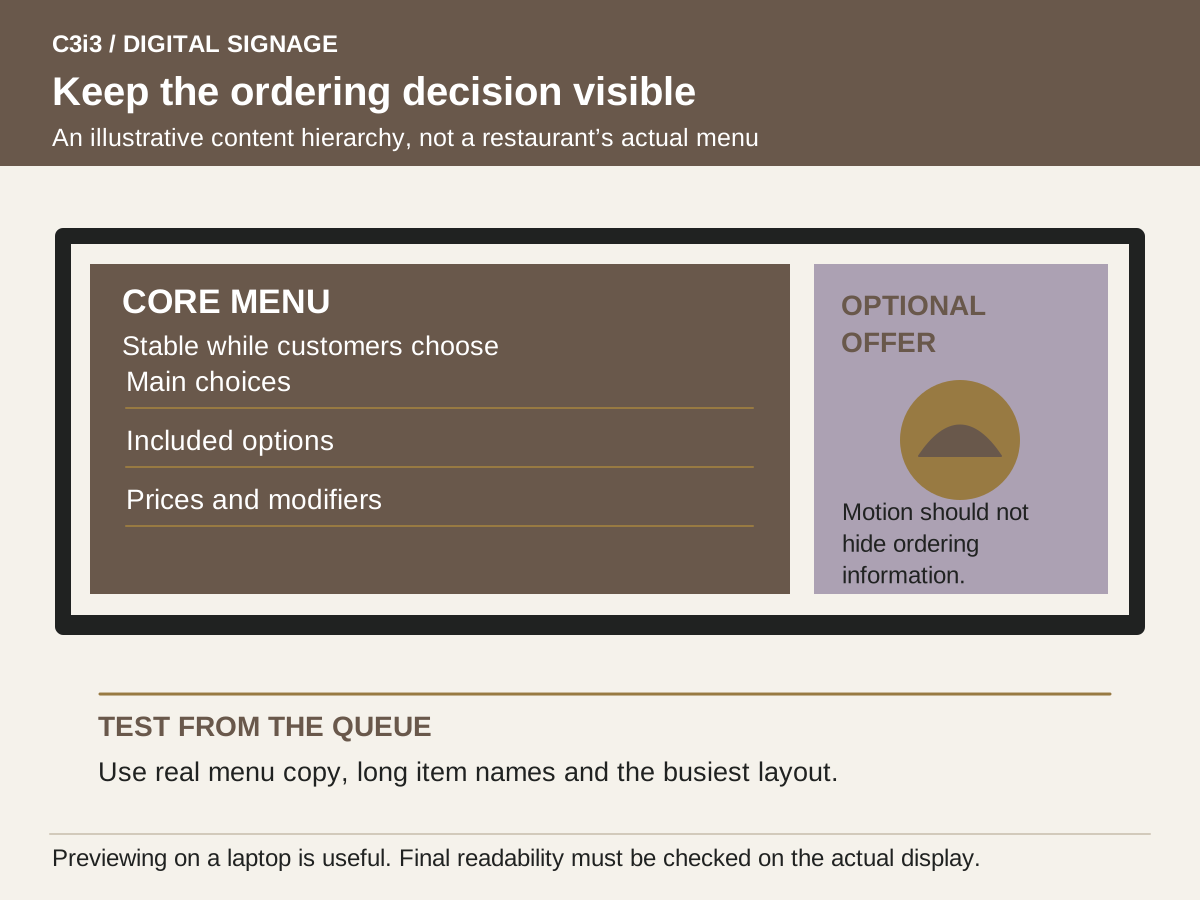
Start with the actual ordering sequence: choose a main item, understand the included options and decide whether to add something else. Group related items so a customer can compare them without searching across several screens. Give essential information a stable location and a clear hierarchy. If the most important choices rotate out of view, a customer may have to wait through the loop or ask staff to repeat information the board should have made obvious.
Test the busiest menu layout from the normal queue, including the farthest position and any angled approach. Use realistic names, prices and modifiers rather than short placeholder words that flatter the design. Promotional imagery should support the choice instead of displacing it. C3i3’s graphic design work can help establish reusable layouts, while the signage buyer’s guide covers screen placement and system compatibility. Final readability has to be checked on the proposed display at the actual site.
Who should control menu prices, names and availability?
Name a source of truth for each field. A restaurant may maintain prices in its POS, a controlled spreadsheet or an approved menu record, but the screen team needs to know which source wins when they disagree. Do not assume that buying a CMS creates a live POS connection. Ask the suppliers whether an integration exists for the exact products, which fields it transfers, how changes are approved and what happens when synchronization stops.
Keep a clear manual procedure even when integration is available. Staff should know how to flag a sold-out item, correct an error and verify that the approved change reached the intended screen. The person responsible for the business information should approve it before a designer or operator publishes it. Preserve item names, price context and required accompanying information during template edits. If a technical limitation prevents a reliable live update, choose a simpler explicit process rather than presenting stale information as current.
How do you schedule breakfast, lunch and limited-time offers?
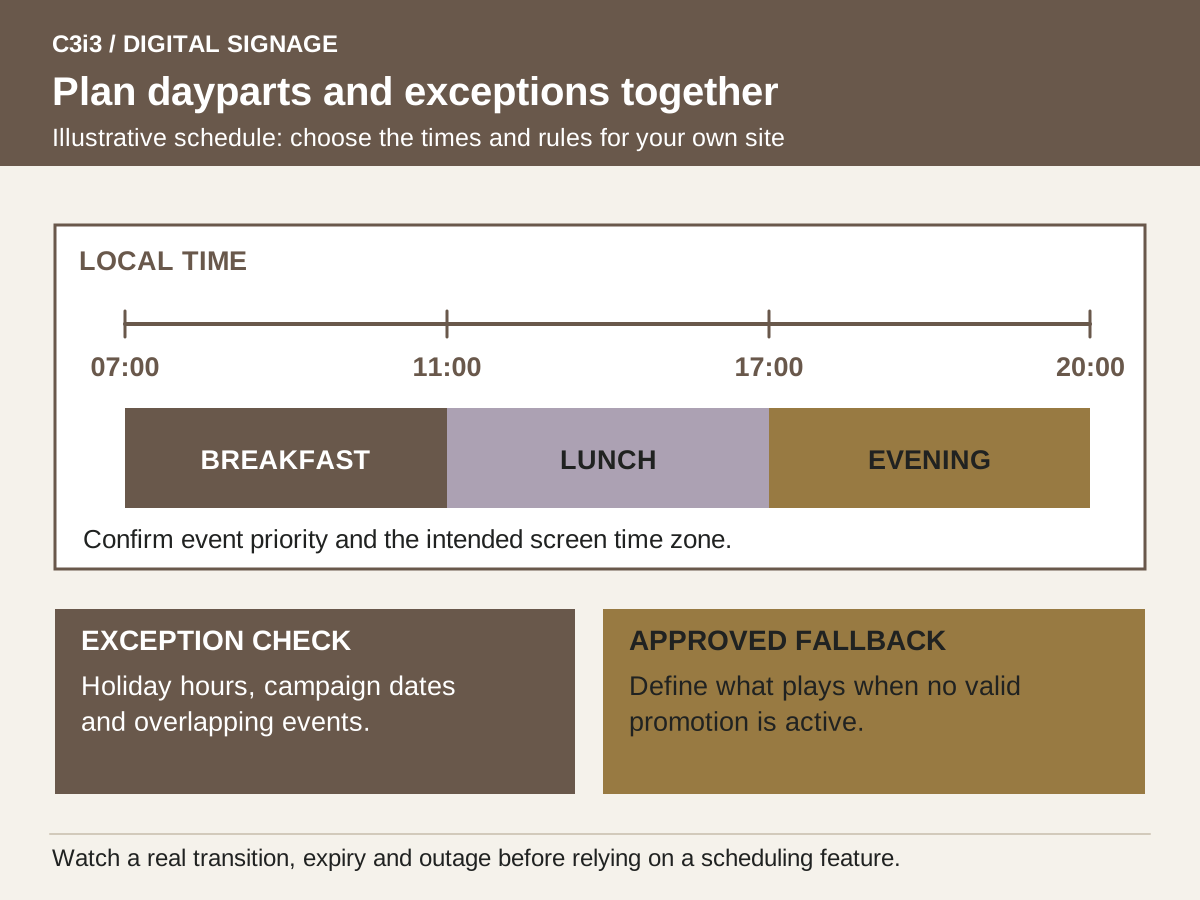
Create a content schedule that names the location, local time zone, active dates and fallback menu for every daypart. Include weekends, holidays and unusual opening hours. A breakfast campaign that finishes at the right time on a weekday can still fail on a holiday if no one reviewed the exception. Keep the regular menu available when a promotion expires unless there is a deliberate reason to replace it with something else.
Yodeck’s schedule documentation provides an example of event-based content and screen-off scheduling. Use your vendor’s actual controls in a demo and test overlapping events, end dates and local clock settings. Previewing a schedule is useful, but it does not replace watching the real display during a transition. Record who is allowed to change operating hours and make the next exceptional date part of the handover. A reliable timetable is easier to maintain than several ad hoc loops with unclear priority.
Where does motion help and where does it interrupt ordering?
Use motion for a short demonstration, a product detail or a brief promotional moment when the audience has time to watch. Keep essential menu information readable for the duration of the customer’s decision. A fast-moving background or a full-screen promotional interruption can make the board harder to use even if the animation is well produced. Plan for a silent environment unless audio is intentionally part of the location and acceptable to staff and customers.
Prepare screen-specific edits with restrained transitions and enough time to read each optional message. Confirm that the player can handle the intended files and that multiple displays behave acceptably together. The production issues differ from a social advertisement viewed on a phone; see our guide to producing video versions for different placements. Request editable layouts for menu updates and separate promotional motion assets so a price change does not require rebuilding an entire video every time.
What should restaurant screens show during a connection problem?
Decide which information remains trustworthy when the screen cannot refresh. A previously approved core menu may still be useful; a live availability display or a time-sensitive promotion may not be. Ask the vendor to demonstrate the exact offline behavior with uploaded content and any integrated sources. ScreenCloud distinguishes stored media from internet-dependent content. The important question is what the customer sees under failure conditions, not whether a sales sheet contains the word offline.
Prepare an operational fallback that staff can actually use. It might include an approved static menu, a way to pause a misleading promotion and a printed alternative available at the counter. Document who can authorize a temporary message and how the normal display is restored. Ask the installer to test power recovery and confirm who handles a failed display during opening hours. Coordinate these responsibilities with the installer handover checklist so restaurant staff are not left improvising a technical repair while serving a queue.
How should you test a menu board before a full rollout?
Run a limited live trial with the actual staff update process and realistic operating conditions. Check a price revision, a sold-out item, a daypart change and an expired promotion. Ask someone unfamiliar with the menu to explain what they can order from the normal queue position. Record where they hesitate or miss information. These observations help revise the visual hierarchy without assuming the board will automatically increase spending or shorten every transaction.
Assign content ownership after launch and schedule periodic checks of the menu record against the display. A screenshot in the CMS may help investigate a problem, but include physical viewing checks because glare, input settings or a panel fault may not appear in a content preview. Use the complete signage budget to include ongoing menu maintenance. When the team can keep one location accurate through ordinary changes, reuse the tested templates and training rather than copying unproven arrangements to every restaurant.
Which restaurant information should stay visible or change on a schedule?
| Content | Recommended operating treatment | Check before launch |
|---|---|---|
| Core menu choices | Keep readily available during ordering | Read from the normal queue position |
| Prices and modifiers | Use an approved source and update owner | Compare sample changes against the current menu record |
| Daypart menu | Assign local time and exception dates | Watch a real transition on the display |
| Limited-time promotion | Set a defined start, end and fallback | Confirm it disappears when expired |
| Sold-out information | Provide a verified manual or integrated process | Test the full update and recovery route |
| Promotional video | Use without hiding essential ordering information | Check silent playback and reading time |
Hypothetical example: separating a fixed menu from rotating promotions
Imagine a counter-service restaurant using two menu screens and one promotional display. Its team initially proposes a single moving sequence across all three. During a full-size review, customers would have to wait for the main choices to return. The owner instead keeps the core menu on two screens and uses the third for a limited seasonal offer.
The menu manager owns item names and prices, while the designer maintains a template with protected layout elements. The operator schedules breakfast and lunch according to the restaurant’s actual hours and checks a holiday exception before opening. A simulated network interruption reveals that the promotion remains cached, so the team chooses a fallback that will not imply a time-sensitive offer is still valid. Staff rehearse a sold-out update and keep a printed menu ready for a screen failure. These are hypothetical planning decisions, not a report of increased sales or a claim that a particular CMS guarantees accurate menus.
Key takeaways
- Keep essential choices and prices easy to find.
- Separate business information approval from visual design.
- Test dayparts, expiration and offline behavior on the actual screens.
- Fund ongoing menu maintenance rather than treating launch as the finish.
Frequently asked questions
Will menu boards automatically update from our POS?
Only if a supported integration is configured for your exact system and use case. Confirm the transferred fields, update timing, approval behavior and failure process with both vendors. Otherwise define a reliable manual update procedure.
Should every menu screen show video?
No. Use the viewer’s task to decide. Stable text and clear category organization can be more useful for ordering, while a separate promotional area may be suitable for motion. Test both in the real viewing environment.
How many screens does a restaurant need?
The answer depends on the amount of essential information, queue layout, viewing distance and screen format. Establish readable sample menus and a site layout before deciding. More screens can increase installation and administration costs without necessarily making choices clearer.
Sources and editorial method
Prepared from linked primary documentation checked November 20, 2026. Vendor documentation establishes stated features and operating conditions. Comparisons and worksheets are C3i3 editorial analysis; worked examples are hypothetical.
- Yodeck: schedules
Explains events, scheduled playback and screen-off periods. Scheduling features and hardware support must be checked for the proposed configuration.
- ScreenCloud: offline playback support
Distinguishes locally cached uploaded media from internet-dependent applications. Confirm behavior on your chosen player and content.
- Yodeck: basic screen information
Documents screen orientation and device-specific settings. Supported controls vary by player type.
Plan the screens, content and updates as one customer experience.
Tell us where the screens will be used, what viewers need to understand and who will update the content. C3i3 can help with the content strategy, design and video assets while you evaluate hardware and installation providers.
Explore graphic design or tell us about your project.