








































In this article
A multi-location signage problem often begins with a simple update: one promotion goes to the wrong branch, an old price returns or a staff member edits the shared template instead of the local version. The screen hardware can be working perfectly while the content process fails. A suitable CMS should help your team publish the right message to the right place with clear authority and a practical recovery route. Evaluate those tasks using your organization’s actual roles and exceptions rather than a feature list alone.
How should you name and organize screens across locations?
Create a device register before building playlists. Identify the site, room or area, screen purpose, orientation, player and local support contact. Use names that help a new operator recognize a screen without relying on memory. “Walnut Creek reception landscape” is more useful than “TV 3.” Keep the register connected to the account and hardware handover so a replacement player can be assigned to the correct destination without guessing.
Organize content around genuine operational differences: separate locations, brands, departments or audience purposes when those differences affect approval and publication. Avoid copying every asset into a new folder simply because a new branch opens. Decide which items are shared originals and which are local variations. ScreenCloud’s groups and spaces provide one documented approach to location-based scope. Evaluate the equivalent structure in your shortlisted CMS and confirm that it is included in the proposed subscription.
Who should create, approve, publish and administer content?
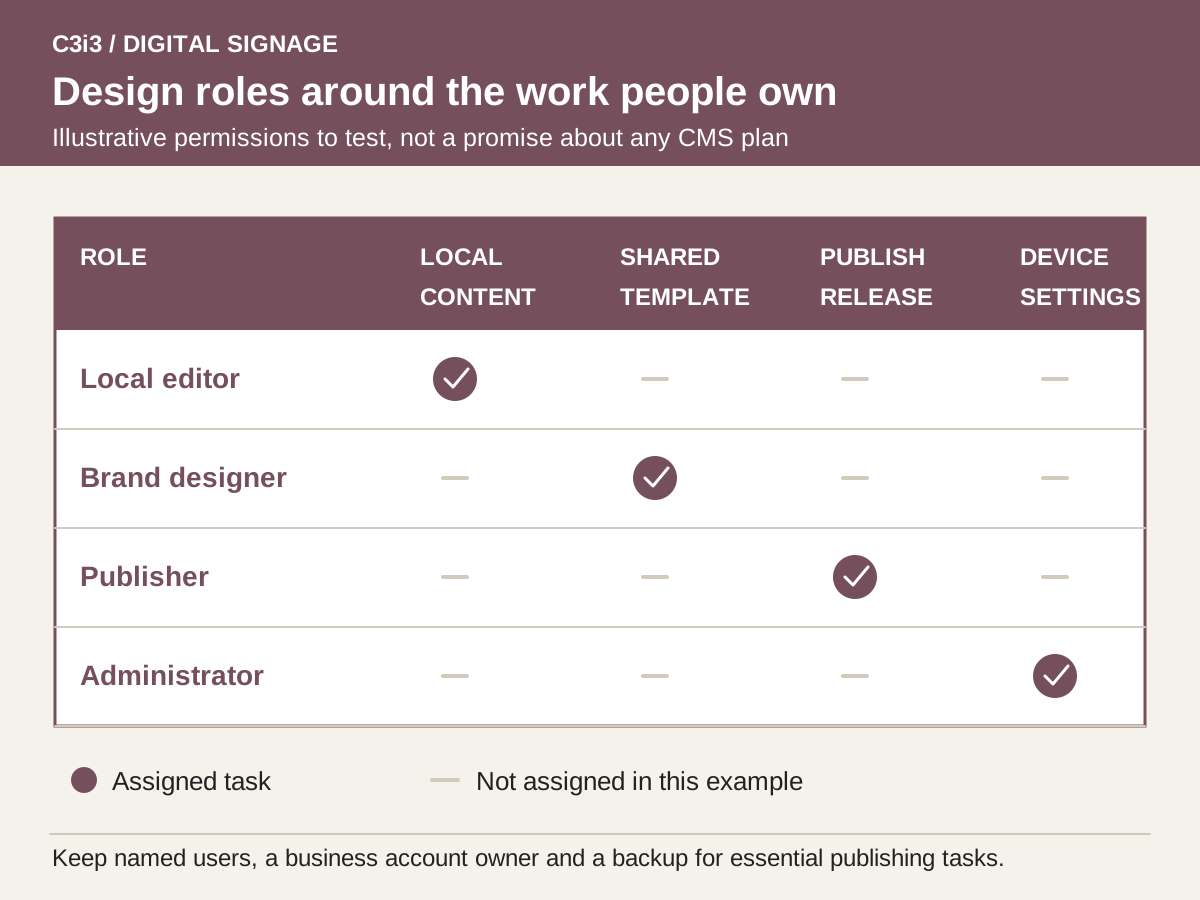
Write a permission matrix in ordinary business language. A designer may create approved templates; a branch manager may edit local hours; a central publisher may release national campaigns; an administrator may manage users and devices. Combining every responsibility in one shared login makes it difficult to limit mistakes or determine who changed something. Give each person the access needed for their task and designate a backup for essential publishing duties.
During the demo, test an action that should be blocked as well as one that should succeed. A local user should not accidentally edit another branch or take over organization-wide administration. Yodeck documents roles, workspace scope and plan-specific advanced controls; other platforms organize them differently. Do not assume a standard role matches your precise approval policy. If the desired separation requires a higher plan or an operational workaround, price and document that choice before rollout.
How do you protect brand consistency while allowing local updates?
Define editable fields and protected structure for each template. Local managers might need to change opening hours, a location image or an approved offer, while the brand team owns type styles, legal copy and visual hierarchy. Keep the original template distinct from a published local variant. A duplicated file with an unclear name is not a dependable versioning system. Document which team updates the shared original and how a change reaches existing variants.
Use real content extremes in testing: the longest location name, an unusually long item description and a message that needs an extra line. Confirm that the resulting export remains readable on the actual screen. C3i3’s campaign asset design can establish those reusable layouts, and editorial calendar planning can organize the publishing cycle. The CMS should then make the agreed controls usable for the staff who maintain the screens, rather than requiring a designer to correct every routine change.
What belongs in a reliable multi-location publishing workflow?
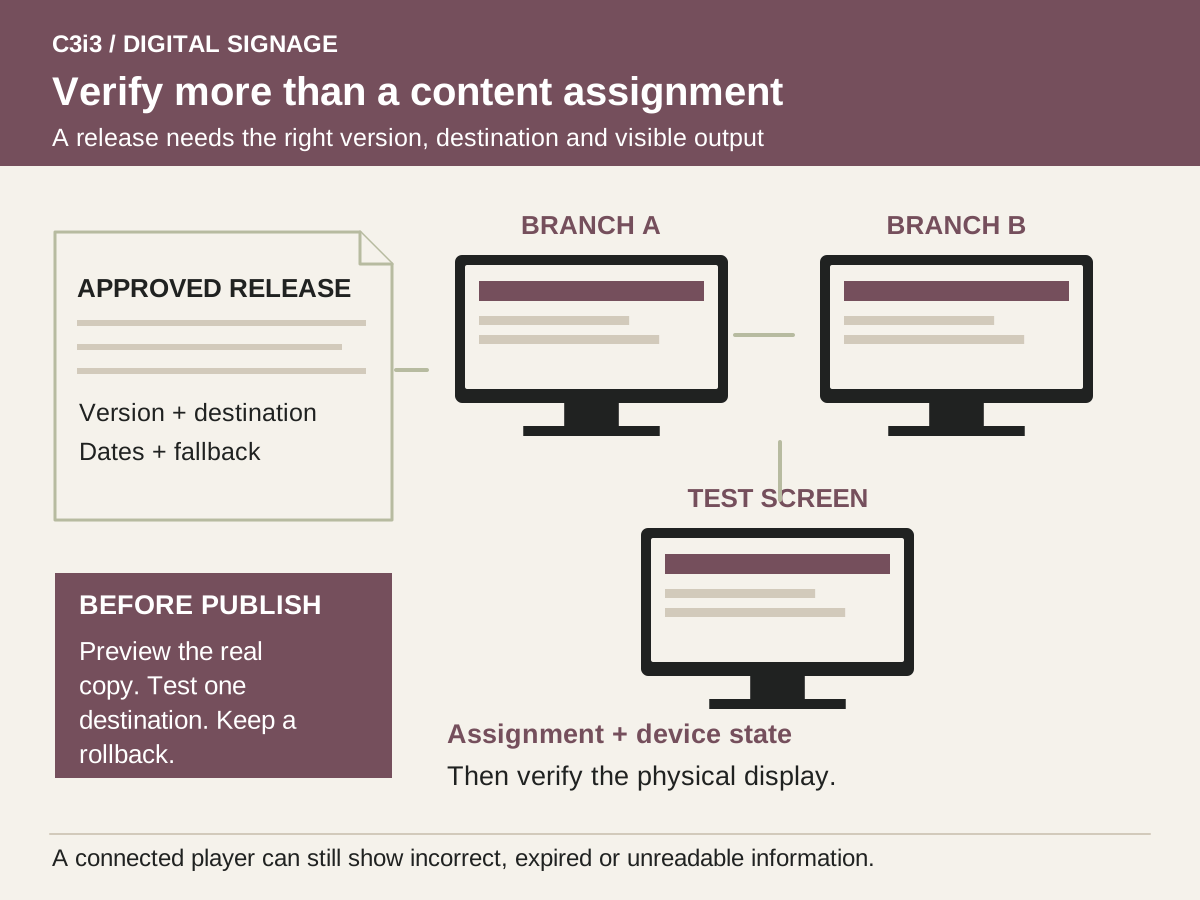
Treat a release as a defined assignment, not simply an uploaded file. Record the audience, target screens, approved version, start and end dates, local time zone and fallback. Check what happens when schedules overlap or a campaign is withdrawn early. Yodeck’s event-based scheduling documentation is a useful example of why timing and priority rules need explicit attention. The chosen platform’s actual behavior should be shown with your campaign scenario.
Preview the intended screen or layout, then use a controlled test destination before publishing broadly. Keep a quick rollback route to a previously approved version. If the CMS lacks a built-in approval stage that meets your needs, decide how sign-off is recorded and who performs the final release. Avoid portraying a manual approval checklist as an automated safeguard. For restaurant use, apply the additional price, availability and daypart checks in our digital menu board guide.
How do you know the correct content reached the actual display?
Distinguish assigned content, player connectivity and visible output. An account can show a successful assignment while the physical display is switched to another input, affected by glare or turned off. Ask what the platform’s status indicators and screenshots actually establish. Build a verification routine appropriate to the business: an operator checks assignment and device state, while someone at the site confirms that important changes are readable and accurate in the room.
Test disconnected behavior with the intended media and live sources. ScreenCloud’s offline guidance differentiates cached files from internet-dependent content. A device continuing to play an older version may look healthy to a viewer while showing an expired message. Decide which content is safe as a fallback, who receives an exception report and who can act locally. Connectivity monitoring is useful, but it is not proof that every business statement on a screen remains current.
What must remain under your control when people or suppliers change?
Keep the business as the documented account owner and record how administrators are replaced. Use named users rather than passing a former employee’s login to a successor. Make routine access review part of staff changes and supplier handover. Separate ownership of artwork, CMS administration, player configuration and equipment warranties because a change in one does not automatically transfer the others. Ask the provider to demonstrate what can be exported and what is tied to its system.
Run a short operational rehearsal before adding more sites: an editor makes a local update, an approver checks it, a publisher targets the right branch and the operator restores the prior version after a deliberately identified issue. Record the time and help required without promising a universal efficiency gain. Include training and administration in the signage ownership budget. The most suitable CMS is the one your team can control consistently, including exceptions and handover, not simply the one with the longest feature list.
Which CMS control should each role demonstrate?
| Role or task | Demonstration | Failure to watch for |
|---|---|---|
| Content creator | Edit a local message without changing the master | Shared template accidentally overwritten |
| Approver | Review the actual message and destination | Approval applies to an outdated version |
| Publisher | Release to one location with an expiration | Wrong screen group or time zone selected |
| Device administrator | Identify and recover a disconnected player | Content editor granted unnecessary device control |
| Site manager | Verify essential content on the physical display | Dashboard status mistaken for proof of visible output |
| Account owner | Remove a departing user and retain access | Organization depends on one former supplier login |
Hypothetical example: one shared campaign with local exceptions
Imagine a business with three branches that shares a seasonal promotion but has different opening hours at each location. The brand designer creates the campaign template. Local managers submit the appropriate hours and a central publisher confirms the final destination list. The CMS is organized so those managers can work on their own locations without modifying another branch.
Before release, the team tests the longest hours message and discovers that it wraps poorly on a portrait display. The designer fixes the template before the campaign is copied. A test also reveals that a branch player can continue showing cached content after losing connectivity. The business therefore chooses a time-independent fallback for that screen and defines a local check for time-sensitive announcements. This example demonstrates a control process, not a verified result from a particular customer or a claim that every CMS offers these permissions on its least expensive plan.
Key takeaways
- Inventory screens by location, purpose and ownership.
- Test blocked actions as carefully as allowed actions.
- Specify destinations, timing, approval and rollback for each release.
- Verify physical output as well as CMS assignment and device status.
Frequently asked questions
Does every digital signage CMS include approval workflows?
No. The available roles, approval steps and audit information vary by platform and plan. Demonstrate the exact separation your team needs. If any step depends on a manual process, record who owns it and what evidence they retain.
Can local managers update only their own screens?
Many systems provide location or workspace-based controls, but their scope differs. Ask a local test user to edit the intended content and attempt access to another location. Check both the user’s role and the destination structure before relying on a permissions claim.
Does an online player status prove our menu is correct?
No. It establishes only the status represented by that indicator. Assigned content may still be wrong, expired or unreadable on the physical display. Combine platform checks with business-content approval and an appropriate on-site verification routine.
Sources and editorial method
Prepared from linked primary documentation checked November 20, 2026. Vendor documentation establishes stated features and operating conditions. Comparisons and worksheets are C3i3 editorial analysis; worked examples are hypothetical.
- ScreenCloud: people, groups and spaces
Documents role and location-based content access. Advanced permissions can depend on the subscription plan.
- Yodeck: users, roles and permissions
Provides a concrete example of users, roles and workspace scope. Several advanced controls are associated with Enterprise plans.
- Yodeck: schedules
Explains events, scheduled playback and screen-off periods. Scheduling features and hardware support must be checked for the proposed configuration.
- ScreenCloud: offline playback support
Distinguishes locally cached uploaded media from internet-dependent applications. Confirm behavior on your chosen player and content.
Plan the screens, content and updates as one customer experience.

Tell us where the screens will be used, what viewers need to understand and who will update the content. C3i3 can help with the content strategy, design and video assets while you evaluate hardware and installation providers.
Explore graphic design or tell us about your project.