








































In this article
A good digital signage installation should leave your business with more than screens attached to walls. You need a documented system that shows the right content, can be maintained safely and has clear ownership when something stops working. The right installer will discuss the viewing environment, mounting conditions, power, connectivity and acceptance tests before promising a finished result. Use this checklist to compare proposals and prepare a handover that your staff can operate. It is a buyer brief, not a substitute for a qualified site assessment or instructions for performing mounting or electrical work yourself.
What should the site survey establish before equipment is ordered?
Ask the installer to inspect the proposed screen locations from both the viewer’s and technician’s perspectives. The survey should consider glare, viewing distance, orientation, mounting surface, access for service and the route for power and network connections. Provide operating hours and any restrictions on when work can occur. If a property manager or landlord must approve changes, identify that dependency before a delivery date is treated as a firm opening commitment.
Expect unresolved conditions to be recorded rather than hidden inside a generic installation fee. A photograph may help with an initial discussion but cannot establish every structural or access condition. Ask who is responsible for assessing mounting suitability, electrical work and any permits or approvals relevant to the project. The signage buyer’s guide explains how the audience and content brief influence placement. The installer’s role is to translate that brief into a feasible site-specific arrangement and make its assumptions visible.
Which details should appear in the written installation scope?
Request a schedule of named displays, players, mounts, cables and accessories, with quantities and locations. Identify who supplies each item and who checks compatibility. Separate preparation, installation, player provisioning, CMS setup and content loading. A proposal that includes “setup” should explain whether that means connecting hardware, creating accounts, assigning schedules or all of those tasks. Those interpretations can represent very different work and ownership responsibilities.
List exclusions beside the included tasks: wall repairs, new power, unusual access equipment, after-hours work, network changes or additional content production may need their own pricing. Specify the approval process for a change discovered on site before it becomes a surprise invoice. BrightSign’s professional services show that pre-configuring players is a distinct service; do not assume it includes the physical installation. Use our budget guide to compare suppliers on the same completed scope.
How should the installer coordinate with your IT contact?
Identify the person who can approve network access and the requirements the player must meet. Ask the installer to provide the device type, connection method, necessary network documentation and remote-support approach before arriving. Decide who stores administrative information and who can change it. Keep responsibility for network decisions with the business and its IT support rather than assuming an AV installer can authorize every connection or security change.
Test the real content path on the intended network. An installation is not proven by a player working on a temporary hotspot if it will normally use a different connection. Verify how the chosen CMS enrolls the device and what remote commands are supported by that model. Yodeck’s device-specific screen settings illustrate that controls differ across players. Record the actual configuration and any dependencies so future troubleshooting starts with evidence instead of a series of guesses about what was installed.
Which acceptance tests should you agree before installation day?
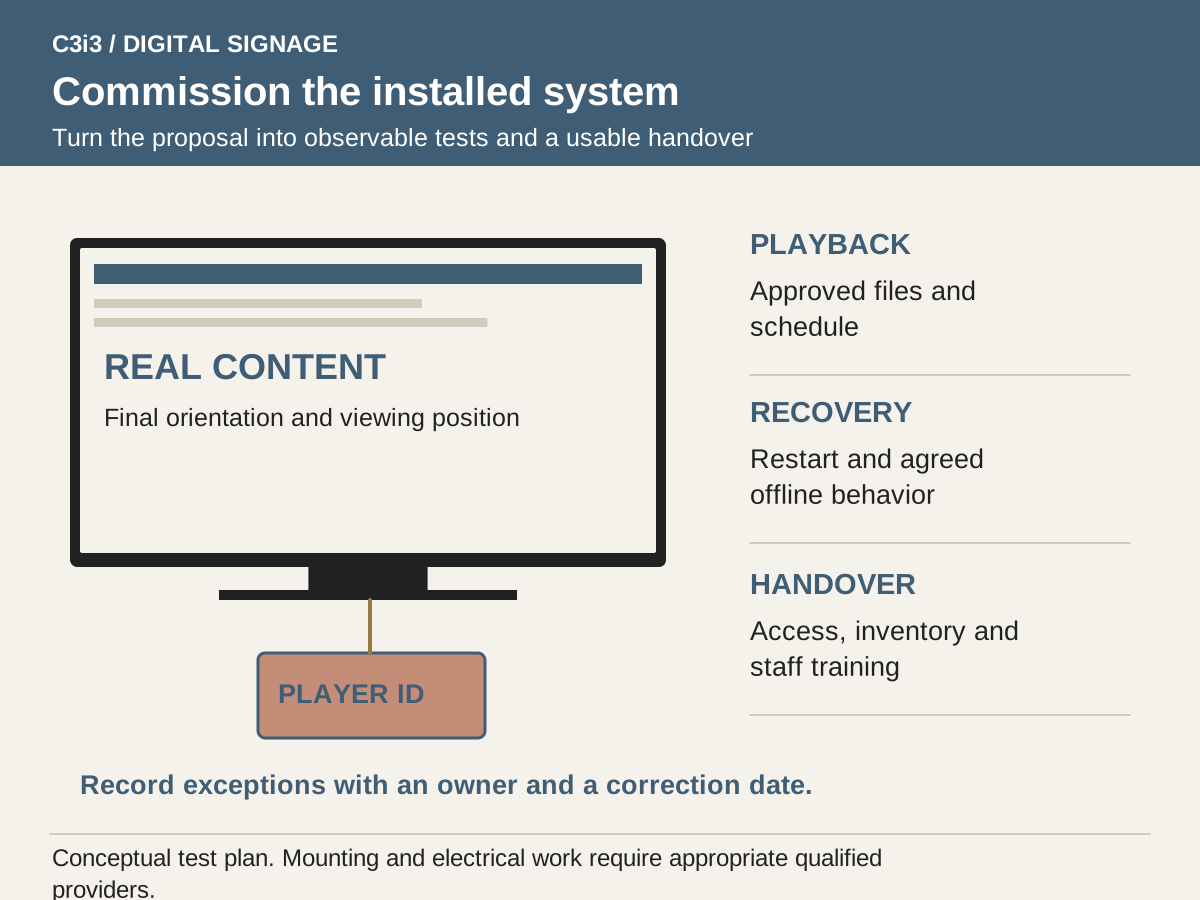
Create an acceptance checklist based on the job the screens must perform. Test the final orientation, actual artwork, a scheduled transition and the normal content update process. View the essential message from typical customer positions and inspect the busiest layout. Check input selection and startup behavior after an agreed interruption. If multiple displays have to form a coordinated experience, include the required behavior explicitly rather than assuming that separate players will stay aligned automatically.
Test a connectivity failure with the planned files and live content. The distinction between cached media and internet-dependent sources in ScreenCloud’s offline documentation is an example of a question that belongs in acceptance. Record any exceptions with an owner and correction date. The business should not have to infer whether a limitation is an accepted design choice, an unfinished task or a fault that the installer still needs to resolve.
What account access, files and training should you receive?
Ask for a device inventory with model and serial information, installed locations, relevant configuration records, warranty details and support contacts. Confirm that the business controls its CMS ownership and can appoint replacement administrators. The handover should identify editable creative files, licensed assets and final exports separately. If the supplier retains responsibility for an ongoing managed service, document what the business can still access and what happens if the arrangement ends.
Have the intended staff member complete a supervised content update and show how to find the support information. Cover the ordinary tasks, the recovery route and the actions staff should leave to a qualified technician. A training recording or written checklist can help the next employee, but it should match the installed system. Use the CMS management guide to specify the user roles and publishing responsibilities. C3i3 can support screen content and templates without pretending that content design replaces competent equipment installation.
How do you evaluate support after the installer leaves?
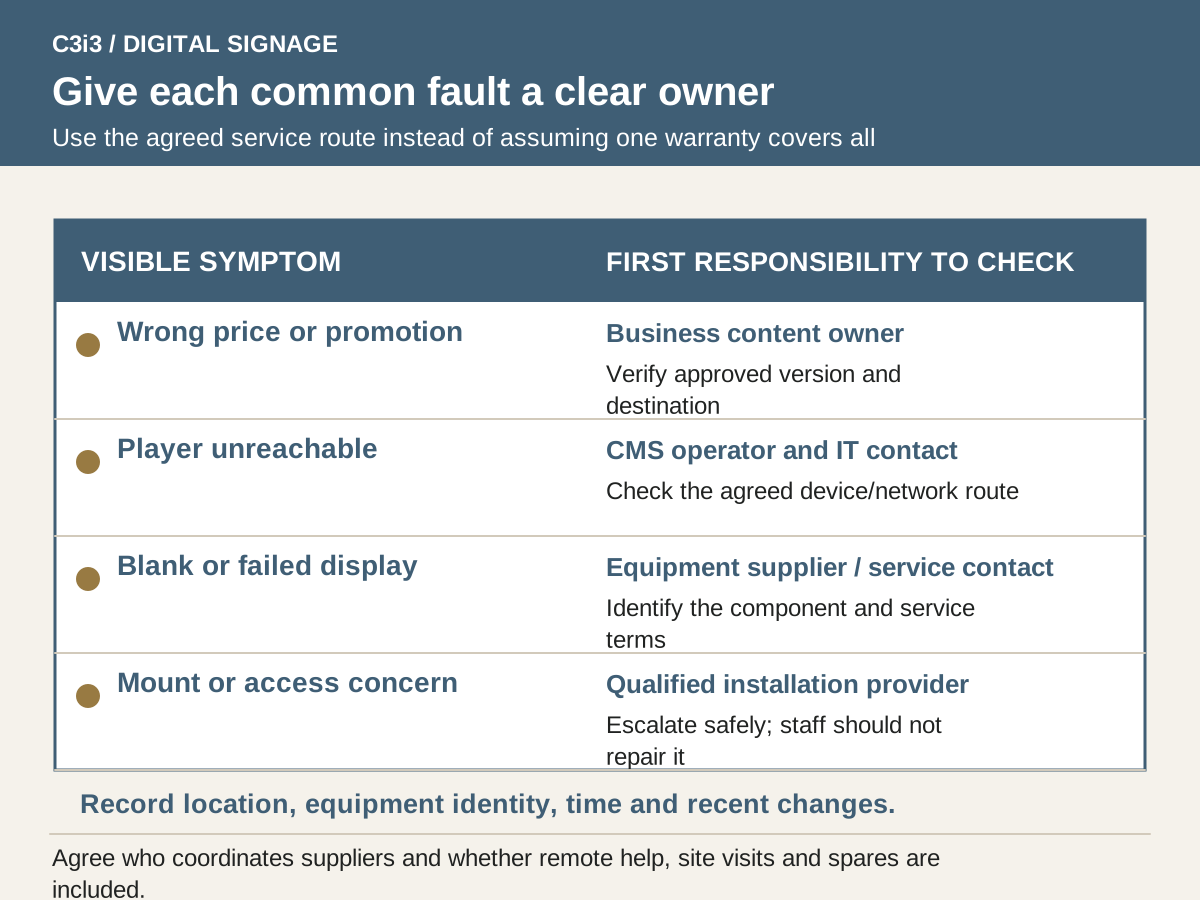
Request a practical fault ownership map. A wrong price may belong to the content owner, a failed player to its supplier, a damaged display to the equipment warranty process and a loose mount to the installation provider. Ask who receives the first call and whether they coordinate the other parties. Compare support hours, remote response, on-site availability, travel charges and spare-equipment arrangements against the business’s actual operating schedule.
Separate warranty coverage from service commitments. BrightSign’s warranty page illustrates product eligibility and registration conditions, while its support form asks for details such as player model and firmware. An installer should leave you with equivalent records for your system. Request references for comparable sites and ask about handover and post-launch corrections, not just appearance. Choose a provider whose documented scope matches your needs rather than relying on a broad promise to “handle everything.”
What evidence should a signage installer provide?
| Project stage | Evidence to request | Acceptance question |
|---|---|---|
| Before quote | Site assumptions and proposed screen locations | Has someone evaluated the actual environment? |
| Before purchase | Model list and compatibility responsibility | Does the equipment support the agreed content? |
| Before installation | Included work, exclusions and change process | Who pays when a site condition differs? |
| During commissioning | Playback, update, timing and recovery tests | Does the complete system work as agreed? |
| At handover | Account access, inventory, files and training | Can the business operate and support it? |
| After launch | Support contacts and warranty responsibilities | Who owns each common fault? |
Hypothetical example: resolving a gap before a showroom installation
Imagine a showroom comparing two installers for a reception display and a product screen. The first proposal includes mounting and connecting the equipment but assumes the customer will create the CMS account. The second includes account setup but excludes the cable route behind the proposed wall. Neither difference is inherently unacceptable, but both must be settled before comparing the totals.
The business names an IT contact, asks for a site survey and gives each installer the same content and support brief. The final scope assigns player provisioning, CMS ownership and staff training explicitly. At commissioning, a staff member publishes a corrected slide and the installer demonstrates the agreed startup and offline behavior. One viewing-angle issue is recorded for correction before acceptance. This is a hypothetical procurement example. It does not claim that C3i3 has inspected the site, selected an installer or verified a supplier’s installation performance.
Key takeaways
- Require a site-specific scope rather than a generic setup promise.
- Identify equipment, connectivity and content responsibilities separately.
- Agree on observable acceptance tests before work begins.
- Leave with account control, device records and a usable support route.
Frequently asked questions
Should an installer choose the content management system for us?
An installer can recommend compatible options, but the business should also evaluate its own update workflow, permissions and ownership needs. Ask staff to test the proposed CMS and confirm the exact plan. Hardware familiarity alone does not establish that the publishing process fits your team.
Does installation include creating the content?
Only if the scope says so. Distinguish final content loading from copywriting, design, video production, templates and future updates. Each item needs an owner, deliverable and revision allowance so the screen is useful after the equipment is installed.
What should we send when reporting a fault?
Provide the location, affected screen, equipment identity, time, visible symptoms and any recent content or network changes. Include a photograph when useful and follow the agreed support route. Staff should not attempt unsafe mounting, electrical or internal hardware repairs to produce a diagnosis.
Sources and editorial method
Prepared from linked primary documentation checked November 20, 2026. Vendor documentation establishes stated features and operating conditions. Comparisons and worksheets are C3i3 editorial analysis; worked examples are hypothetical.
- BrightSign: professional digital signage services
Examples of pre-provisioning and Wi-Fi installation services. A manufacturer’s configuration service does not establish the scope of an on-site installer.
- Yodeck: basic screen information
Documents screen orientation and device-specific settings. Supported controls vary by player type.
- ScreenCloud: offline playback support
Distinguishes locally cached uploaded media from internet-dependent applications. Confirm behavior on your chosen player and content.
- BrightSign: player warranty program
Warranty eligibility, registration and exclusions are product-specific. Player warranty is different from installation labor or display coverage.
- BrightSign: requesting technical support
Shows the model, firmware, authoring version and problem detail needed for a useful support request.
Plan the screens, content and updates as one customer experience.

Tell us where the screens will be used, what viewers need to understand and who will update the content. C3i3 can help with the content strategy, design and video assets while you evaluate hardware and installation providers.
Explore graphic design or tell us about your project.