







































In this article
A receptionist can sound helpful while leaving an appointment unbooked or a customer record incomplete. The integration is the part that turns a conversation into an operational result. To evaluate it, ask which action reaches which system, under whose authority and with what proof of success. This guide helps business owners and implementation teams test calendar and CRM connections without confusing an integration logo with a completed workflow.
Which action does the integration actually perform?
Describe the intended result in a sentence your staff can verify: create a callback task for this location, reserve this appointment type or add a contact with a particular status. “Connects to our CRM” is too broad. Ask whether the connection is native to the selected plan, delivered through another automation service or built as custom work. Each arrangement can have different setup, support and maintenance responsibilities.
Separate reading, writing and notifying. A system that reads availability may not create events. An email containing a transcript may not update the customer record. A connector that creates contacts may not associate them with an existing company or assign an owner. Smith.ai’s integration directory illustrates how vendors list different products and connection categories; verify your specific action with a demonstration. Link every required action to an acceptance test before approving the implementation.
What makes an appointment genuinely confirmed?
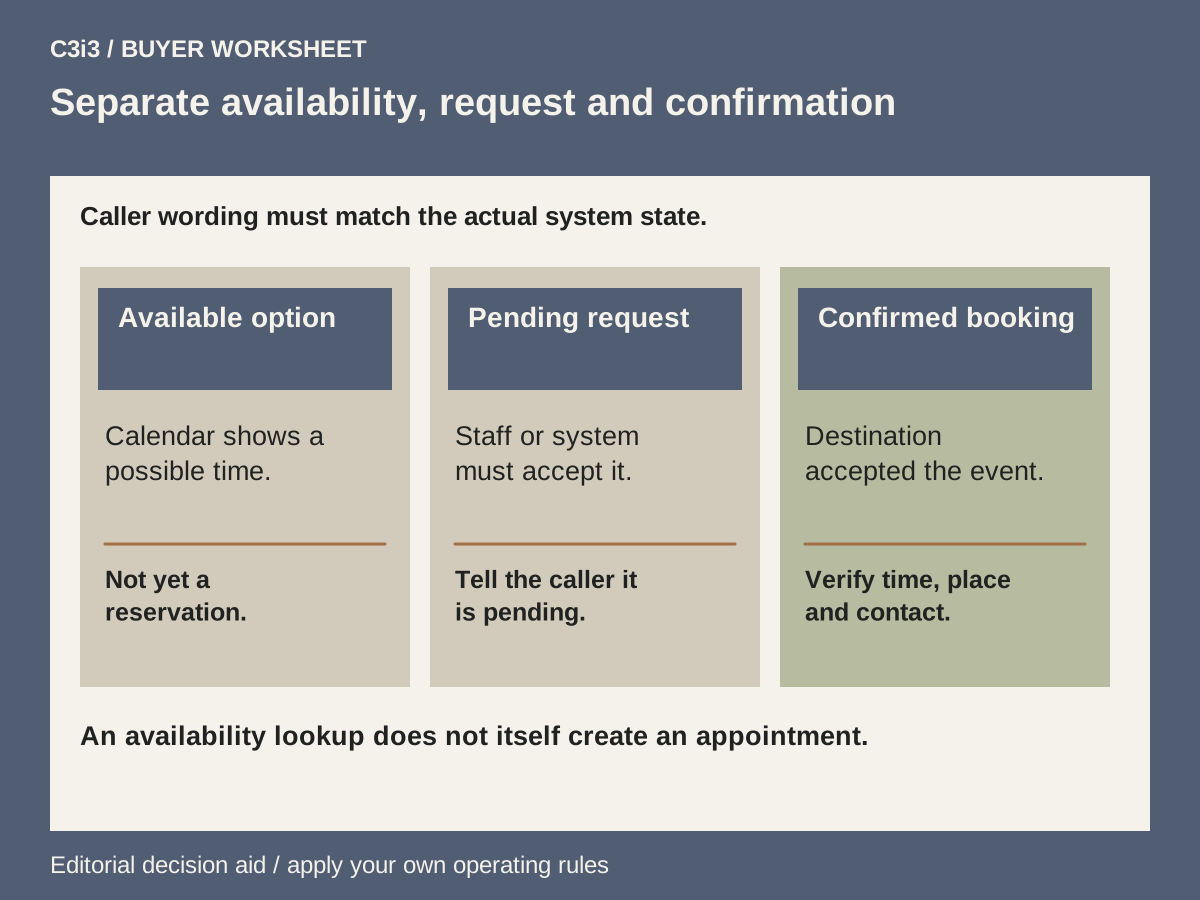
Specify the appointment type, duration, location, staff or resource, time zone and any buffer your operations require. Clarify whether callers may choose any open time or only slots permitted for that service. Field service work may need a review of the address or travel feasibility before the business can promise a visit. The words used during the call must distinguish an available option, a pending request and a confirmed booking.
Ask the supplier to show the event in the destination calendar after the test call. Verify the correct date, location, attendee information and confirmation message. Availability checks and event creation are distinct concepts: Google’s free/busy API documentation describes an availability query, not an appointment reservation. An integration should also handle a slot that becomes unavailable and avoid telling the caller a booking succeeded when the destination rejected it.
Which CRM fields should move from the call?
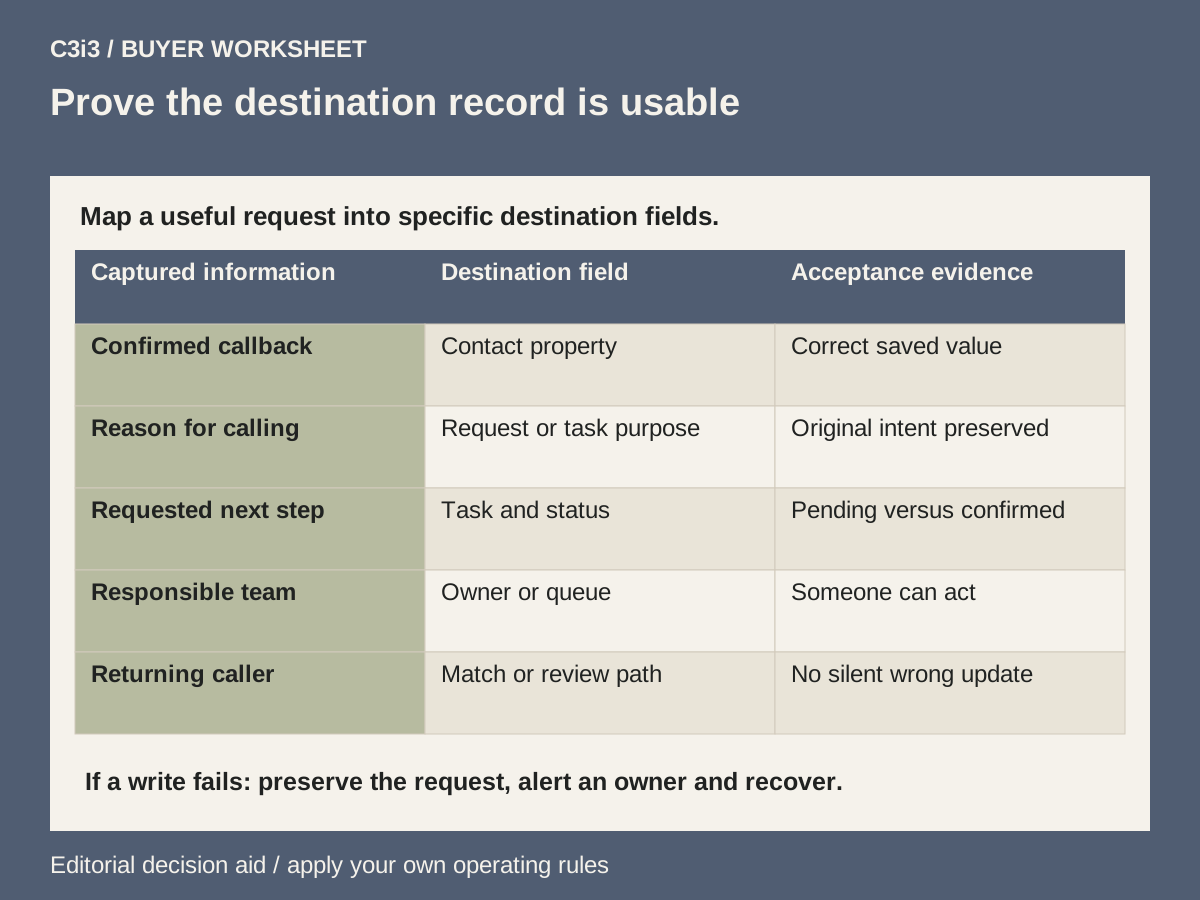
Start with the minimum information the receiving team needs to act. Typical fields include verified name, callback details, business or service address, call purpose, requested service and preferred next step. Mark which values came directly from the caller and which were assigned by your rules. Map them to specific destination properties rather than leaving everything inside a long free-text note.
Identify required fields, allowed values and the default owner. If the CRM expects a particular status or service category, an unrecognized value needs a controlled fallback. Keep the caller’s exact words where interpretation could change the request, while giving staff a concise action summary. HubSpot’s contact documentation is a technical example of records and properties; it does not prove any receptionist’s compatibility. Your test should inspect the actual contact and task your chosen connection produces.
How do you prevent duplicate or incorrect customer records?
Decide how a returning caller is matched to an existing record. A phone number, email address or another identifier can help, but each has exceptions: shared business lines, changed contact details and multiple people at one company. Ask what happens when more than one record matches or no dependable identifier is available. Automatic creation should not silently merge unrelated people or overwrite established details.
Test a new contact, a known contact with changed details and two contacts sharing a business number. Inspect both the record and its history after the call. Confirm which fields the integration is allowed to update and which require review. Keep a clear path for staff to resolve ambiguous matches. A readable call summary should support that work without turning every conversation into a duplicate record. Add the same cases to your provider demo checklist so this behavior is visible before launch.
What happens when the calendar or CRM is unavailable?
Ask the provider to demonstrate a rejected write, expired authorization or unavailable destination using a safe test environment. The caller should receive an honest explanation and an alternative next step. Your team needs a visible pending item containing enough information to recover the request. A system should not lose the inquiry simply because it could not complete the automated action immediately.
Define who receives the failure alert, how long the item remains pending and what prevents a later retry from creating duplicate work. If automatic retry is supported, establish the conditions and a way to see its result. Do not accept “we retry” as a complete recovery plan. Assign support responsibility across the receptionist vendor, connector provider and business software administrator. The pricing guide explains why that support and maintenance scope belongs beside the integration setup fee.
What evidence should you collect before approving the connection?
Use a small test register with a call scenario, expected action, destination record reference, observed result and owner of any correction. Inspect the calendar, contact, task and confirmation message separately when the workflow creates them. A successful conversation is not sufficient evidence that every downstream action completed. Keep test data clearly distinguishable from live customer information and remove it through the systems’ normal authorized processes after evaluation.
Plan access and maintenance as well as the initial test. Use appropriate account permissions, document who can revoke the connection and decide how credential changes are handled without exposing secrets in call notes. Retest the essential scenarios when the connection, booking rules or CRM structure changes. C3i3 can help plan AI workflow automation and align the website inquiry route; the selected suppliers must verify their own supported actions.
What should the integration acceptance worksheet prove?
| Test | Expected evidence | If it fails |
|---|---|---|
| New caller creates an inquiry | Correct contact, purpose, owner and task | Preserve the request and assign correction |
| Returning caller changes details | Correct existing record and limited updates | Route ambiguous identity for review |
| Caller books an allowed slot | Actual event with location and confirmation | Keep request pending without a false promise |
| Two callers request the same slot | Only an accepted booking is confirmed | Offer another permitted route |
| Destination rejects a write | Visible failure and owned recovery item | Staff restore the request safely |
| Connection is revoked | Access stops and calls have a fallback | Restore through the authorized admin route |
Illustrative example: a request is different from a reservation
A hypothetical service business allows callers to request an assessment, but staff must first check coverage and travel time. Its receptionist integration creates a contact and an assessment-request task. It records the preferred time as a request field rather than creating a confirmed appointment. The caller hears that the team will review the request and respond through the agreed route.
If the business later permits direct booking for a defined appointment type, it adds calendar acceptance tests instead of merely changing the spoken script. Those tests cover time zones, an unavailable slot, a returning contact and a destination failure. The team approves the change only after inspecting the actual records. This example explains an implementation distinction and does not describe a live C3i3 customer or a tested vendor capability.
Key takeaways
- Specify the exact read, write and notification actions.
- Inspect real destination records, not just the conversation transcript.
- Design duplicate handling, failure visibility and recovery ownership before launch.
Frequently asked questions
Does a calendar integration guarantee that a call can book appointments?
No. Confirm the supported appointment action, permissions, plan and booking rules. Reading availability and saving an accepted reservation are different operations.
Is emailing a transcript a CRM integration?
It may be a useful notification, but it does not by itself establish that a contact, task or status was updated in the CRM. Judge it against the record your workflow needs.
Who should own an integration error?
Name a business owner for recovering the caller’s request and identify which supplier or administrator fixes the technical cause. Those responsibilities should be agreed before launch.
Sources and editorial method
Prepared from linked primary documentation checked November 20, 2026. Vendor documentation establishes stated features and operating conditions. Comparisons and worksheets are C3i3 editorial analysis; worked examples are hypothetical.
- Smith.ai: integrations directory
A directory of integration categories and supported products. A listing does not establish every required action or field mapping.
- Google Calendar API: free/busy query
Primary technical documentation distinguishing availability lookup from creating an appointment.
- HubSpot developer documentation: contact records
Primary documentation for contact operations, properties and identifiers. It does not establish compatibility with a particular receptionist.
- Jobber Help Center: Receptionist powered by Jobber AI
Current product operation, configuration and conversation billing definitions. Older cached help pages may show different terms.
Plan a clearer call-handling and customer follow-up workflow.

Tell us your call types, approximate volume, booking system and the handoffs you need. C3i3 can help clarify the website, content and workflow requirements before you select a provider.
Explore marketing automation or tell us about your project.