






































In this article
The new website is approved. Then a service changes, a product image needs replacing and the person who manages the content discovers that an ordinary update requires someone to edit the layout. The design project is finished, but the business still cannot maintain its own information.
For a San Francisco business considering web design, editing and handover deserve a place in the brief before launch. The question is not whether the platform has a dashboard. It is whether the right person can complete the actual updates the business needs, with sensible limits and a clear route for specialist work.
Use the tasks below as an acceptance review. They apply to a small marketing team and to an enterprise organization with separate content, product and technical reviewers. They are working examples, not evidence about a particular client or a recommendation that every employee receive administrator access.
Which updates must your team perform without rebuilding a page?
Start with the ordinary changes that affect customers. A professional service business may need to update a service description, replace a team biography or change the information requested on an enquiry page. An enterprise product team may need repeatable fields for specifications, downloadable documents and regional availability.
Write each task as a small action with a clear beginning and end. “Manage content” is too broad to test. “Replace an approved product document on the relevant product page and confirm the old link is retired” is a task someone can demonstrate.
Separate content changes from structural changes. Replacing an image within an approved component is different from designing a new interactive comparison tool. A useful brief makes that boundary visible so editors are not promised unrestricted changes that the system cannot safely support.
The guide to choosing a website, app or landing page can help establish the overall format. This review goes further into what your people need to maintain after the format is chosen.
Use recent requests to create the task list, not a speculative catalogue of everything the business could ever publish. Keep uncommon structural requests in a separate backlog. That makes the handover focused enough to test and makes later scope conversations more specific.
Does the content model match how the business actually works?
A page builder can make a page editable without making it easy to maintain. When every specification is typed into a freeform block, an editor may have to remember formatting and placement rules that should be part of the system. At the opposite extreme, an overly rigid template can force important information into the wrong field.
Review a representative page using real approved content. Ask which information should be reusable, which should be structured and which needs editorial freedom. A product title, related document and service contact may need different treatment. Do not use a short placeholder paragraph to approve a template that will later hold a complicated offering.
| Information | Question for the design team | Task to demonstrate |
|---|---|---|
| Service scope | Can approved text change without breaking the layout? | Revise a paragraph and preview it |
| Product document | Is the file linked from the right product? | Replace a document and test the link |
| Related service | Is the relationship deliberate rather than copied everywhere? | Add a relevant service reference |
| Image and description | Can an editor preserve meaning and accessibility? | Replace an image and review its alternative text |
Ask the team to demonstrate a longer title, a missing optional field and an item being retired. These ordinary edge cases show whether the content structure reflects the business or merely looks correct with the initial sample.
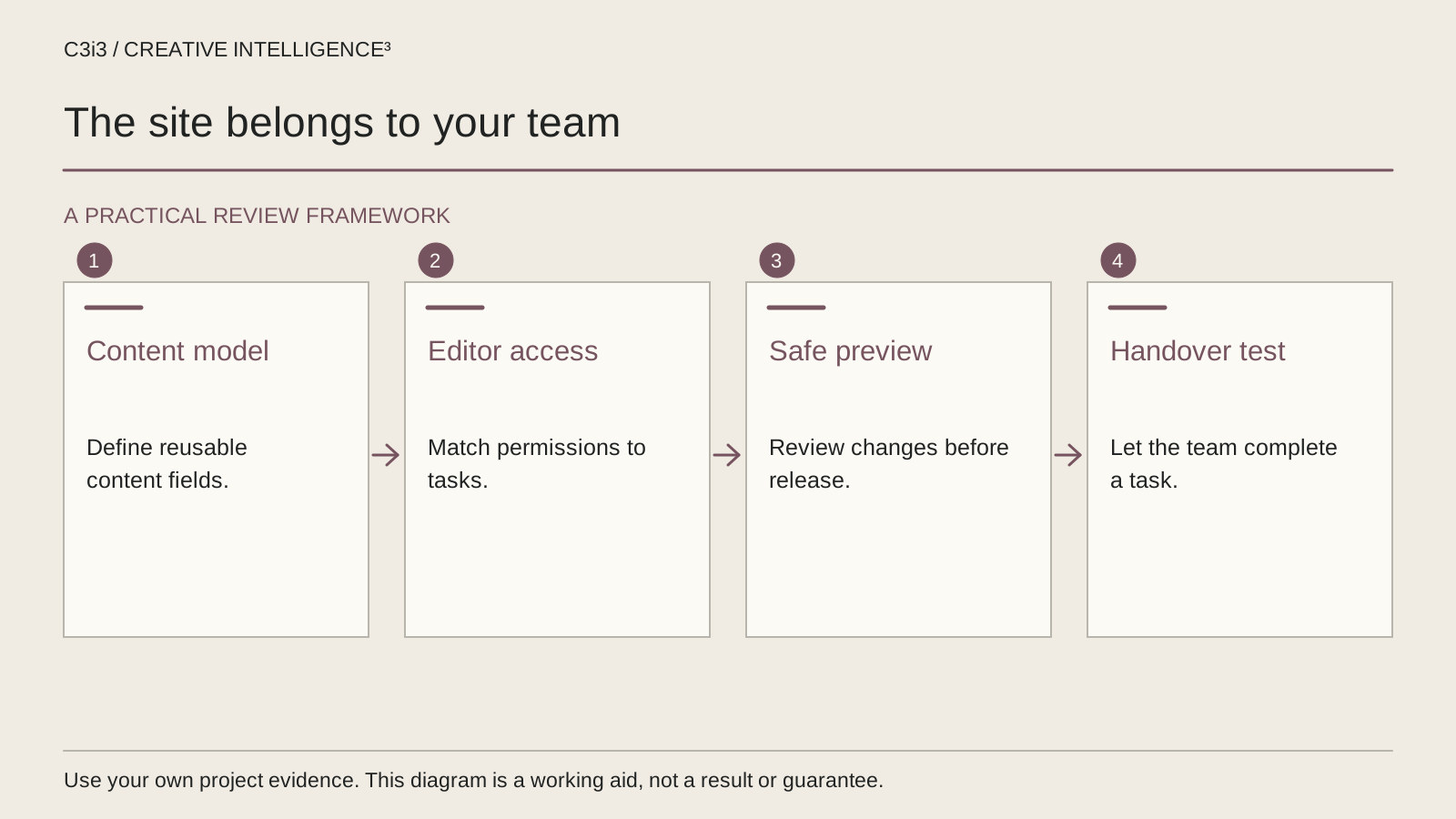
Which permissions do editors actually need?
Name roles around responsibilities rather than seniority. The person writing content may need to save a draft but not install software or change account access. A reviewer may need to comment or approve without publishing. The publication owner needs a clear way to release the approved version.
The platform determines the available controls. WordPress documents roles and capabilities such as editing content, publishing and managing administrative settings. Those defaults are an example, not a description of every CMS or every customized WordPress installation.
Ask the supplier to demonstrate the role that the intended editor will actually use. A walkthrough performed as a full administrator can hide restrictions or expose controls that ordinary staff should not need. Keep access review separate from the public content review.
For an enterprise team, involve the person responsible for account access. Document how a new editor is added, who reviews permissions and what happens when a person leaves. Do not put passwords into the content guide or share one account simply because it seems convenient.
The account handover questions help frame this discussion. The aim is reliable work with appropriate control, not the largest possible permission set for everyone involved.
Can the editor preview, publish and undo a real change?
A practical acceptance session starts with a representative task, the intended user role and a copy of the instructions. Ask the editor to perform the task while the delivery team observes. Notice where the process depends on an undocumented trick or knowledge that only the developer possesses.
Review the preview as a customer would encounter the content. Check headings, links, images and the next action, including a narrow display. Do not treat a successful save message as proof that the public page is correct.
Then test the review and publication route. If another person must approve the change, establish how the editor knows it is ready and how the approver knows what changed. Make the point of publication unambiguous.
A recovery test matters too. Identify what can be reversed in the CMS and what requires restoration from another system. A content revision feature, a database backup and a full deployment rollback are different mechanisms. Ask which one applies to the demonstrated mistake and who is responsible for using it.
Record the observed outcome of each task in a handover checklist. A task can be complete, require correction or require a specialist procedure. These statuses are more useful than a single statement that the website is “fully editable.”

What should the handover package contain?
Use the demonstrated tasks to build the handover material. A concise guide should explain where approved content lives, how it is changed, how it is reviewed and how the result is checked. Screenshots or short recordings can help when they show the actual delivered interface and do not expose sensitive account information.
Include a task boundary list. Editors should know which changes they can make, which require review and which belong with technical support. Keep a named business owner for questions about wording or product facts. An agency cannot resolve every internal factual disagreement through a CMS manual.
Ask for a record of relevant systems: the content platform, hosting or deployment arrangement, domain administration and necessary integrations. Record ownership and support contacts rather than credentials. A store or application may require a separate operational handover beyond the public website.
Connect the guide to the web design scope and the ongoing support arrangement. The pre-redesign review is useful if the business is deciding whether these problems justify a rebuild or a narrower repair.
A polished manual that describes a different version of the site is not a finished handover. Ask the intended editor to follow the instructions on the delivered version and note the result.
How do you accept the site without assuming the work is finished forever?
Agree which tasks must pass before launch and which can remain in a documented later scope. A critical service update should not be left to an undefined future training session. A rare new component may reasonably need a separate design request if that boundary was agreed from the beginning.
After the first real content change, review the process again. The business may discover that a label is ambiguous, an approval email goes to the wrong person or a document replacement needs another check. Capture these findings so they improve the process instead of becoming permanent workarounds.
Use the existing San Francisco service page and Bay Area service hub to explore the broader work. If your editing problem sits alongside campaign, enquiry or ownership issues, return to the guide to choosing the first marketing problem to fix.
The acceptance question is practical: can the intended person complete the agreed task, obtain any required approval and check the public result? If the answer depends on access they do not have or steps that nobody has documented, the task still needs attention. A clear record lets the business discuss that gap without turning every small issue into a new website project.
Keep this checklist beside you
Questions before the next step
Does a website have to use WordPress to be editable?
No. Different content systems provide different editing and approval arrangements. Choose using the business tasks and technical requirements, then test those tasks on the actual implementation. A familiar platform name does not establish whether a particular site has been configured well for the editors who will use it.
Should our marketing staff have administrator access?
Not automatically. Give staff the access required for their responsibilities and keep administrative authority with the appropriate owner. Some tasks need broader permissions, while ordinary content work may not. Ask the delivery team and your access owner to demonstrate the intended role and record what requires escalation.
What if we only update the website occasionally?
A small number of updates still needs a dependable process. Document the recurring tasks, identify the person responsible and decide which work is handled internally or through support. Test an occasional update before launch so a long gap between changes does not leave the business dependent on undocumented instructions.
How C3i3 Can Help
C3i3 can help San Francisco businesses design content structures, review editing responsibilities and define a practical handover. Bring the updates your team struggles to make and the approval steps you need to preserve. We can connect those requirements to website design and an appropriate support process.