








































In this article
A social media content calendar should prevent the question “What should we post today?” from interrupting useful work. It should also prevent a more difficult form of confusion: scheduling a product demonstration before the team has the footage or sending viewers to a page that is not ready.
This guide shows how to plan a month of business content around customer questions, available material and a practical production sequence. It is for teams that already have a direction and need to turn it into a workable schedule. If the audience or channel choices remain unclear, use the social media strategy guide first. A calendar organizes a direction; it cannot supply one by itself.
What should you decide before filling a monthly content calendar?
Decide which audience, offer and customer questions the month will serve. Then establish what original material the business can realistically supply. Those boundaries make scheduling a useful execution task instead of a search for unrelated ideas.
Start with a short list of priorities. A hypothetical commercial worklight brand might choose one product family and questions about positioning, handling and selecting the relevant configuration. It may have current product photographs, one demonstration session and a family page. That material establishes a reasonable starting boundary. The team does not need to invent a different campaign for every date.
How much content should you commit to?
Commit to what the team can prepare well and sustain. The calendar should reflect production capacity, the complexity of the explanations and the audience’s needs. There is no universal posting frequency that turns a calendar into a successful marketing plan. A useful schedule leaves space for source review, editing and changes to the business offer.
Keep ordinary operations visible. If the relevant product will be unavailable to photograph during part of the month, that affects the production sequence. If a supporting page needs revision, schedule that dependency before the linked content. The SMO agency services guide explains why those practical improvements belong alongside content production in a useful scope.
Which fields make a social media content calendar useful?
A useful entry records the customer question, format, source material, readiness date, publication slot, destination and review note. It should also identify who will move the item to its next stage.
Keep production and publication separate. A video may be scheduled for a Thursday release while its footage must be available the previous week. Recording only the publish date hides the earlier dependency. Similarly, a draft being complete does not mean the final export or website destination is ready.
What should the entry say beyond a topic name?
Replace broad labels such as “product spotlight” with the actual question. “How can the light be positioned for this task?” gives the creator a concrete explanation to develop. The format field might specify a short visible demonstration. The source field identifies the footage and current product page. The destination field names the relevant family overview, if a website visit is appropriate.
Add a status that describes the work, such as source ready, draft, final asset or published. If an item is blocked, write down the missing input. A short link to the content record is often more useful than putting the entire draft inside a cramped calendar cell. Keep the system easy to maintain; a complex template that nobody updates stops representing the work. The team-and-agency handoff guide explains how to make the source record usable by the people producing the asset.
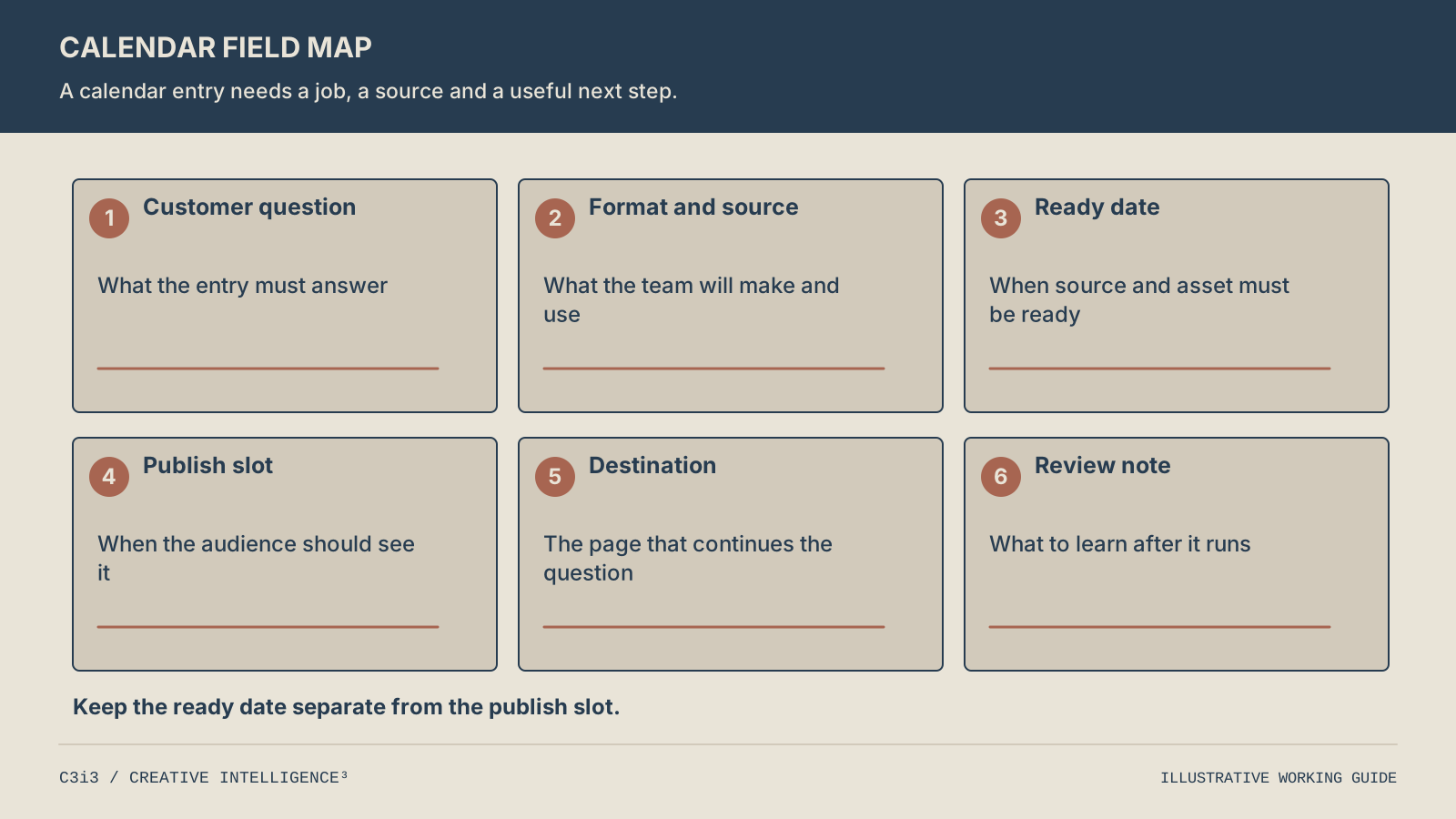
Record the customer question, format, source material, readiness date, publication slot, destination and review note. Keep the production date separate from the intended publish date.
How do you schedule backward from a planned publication date?
List the dependencies required for the final asset, then place those steps before its intended publication slot. If the source or destination cannot be ready in time, change the slot or choose another useful piece.
For a demonstration, work backward through final export, editing, feedback, footage capture and preparation. The sequence matters more than a standard number of days. A simple annotated photograph may need fewer steps than a video requiring a physical setup. Give the creator enough context to know what must be visible before recording begins.
How should scheduled publishing fit the plan?
Scheduling can help execute a finished plan, but it does not remove the need to check the asset and destination. LinkedIn’s official Page guidance describes selecting a publication date and time for scheduled posts. Confirm the scheduling options available in the actual account and tool. The calendar should retain the intended slot and the final live record rather than assume that entering a date proves publication occurred.
Group related production when it makes practical sense. During one session, a worklight brand might capture the wide setup, a closer view of the positioning mechanism and the detail needed for a comparison. Those are different views supporting different questions. The product-feature content guide explains how to turn that source material into distinct explanations instead of releasing several nearly identical clips.
What could a practical four-week business content calendar look like?
A useful month can move from understanding the task to comparing details, seeing use and resolving a follow-up question. The sequence should give each item a distinct reason to exist.
The following hypothetical worklight example assumes the brand has suitable source material and current product information. It does not describe an actual product’s capabilities or a recommended frequency for every business. Two planned items a week are shown only to make the workflow concrete.
| Week | Customer question | Planned asset | Supporting destination |
|---|---|---|---|
| 1 | What task does this product family help with? | An annotated overview and a short introduction | Current family overview |
| 2 | Which physical differences should I compare? | A deliberate comparison and a close-up clip | Relevant configuration information |
| 3 | How does the setup work in use? | A practical demonstration and a setup sequence | Public setup guidance |
| 4 | What should I confirm before choosing? | A focused follow-up answer and a recap | Selection guidance or an appropriate inquiry route |
How should the team check for repetition?
Read only the customer-question column first. If several rows answer the same thing, combine them or identify the genuinely different decision each should support. Then inspect the source column. If two assets need the same limited footage, decide whether that reuse adds clarity or simply changes the crop. The aim is a coherent month of useful material, not a large total of slightly different exports.
Finally, read the plan from the buyer’s perspective. Someone may encounter the comparison before the introduction. Each item should therefore make enough sense on its own while offering a clear route to the deeper explanation. The calendar supplies an editorial sequence, not a promise that viewers will experience every post in that order.
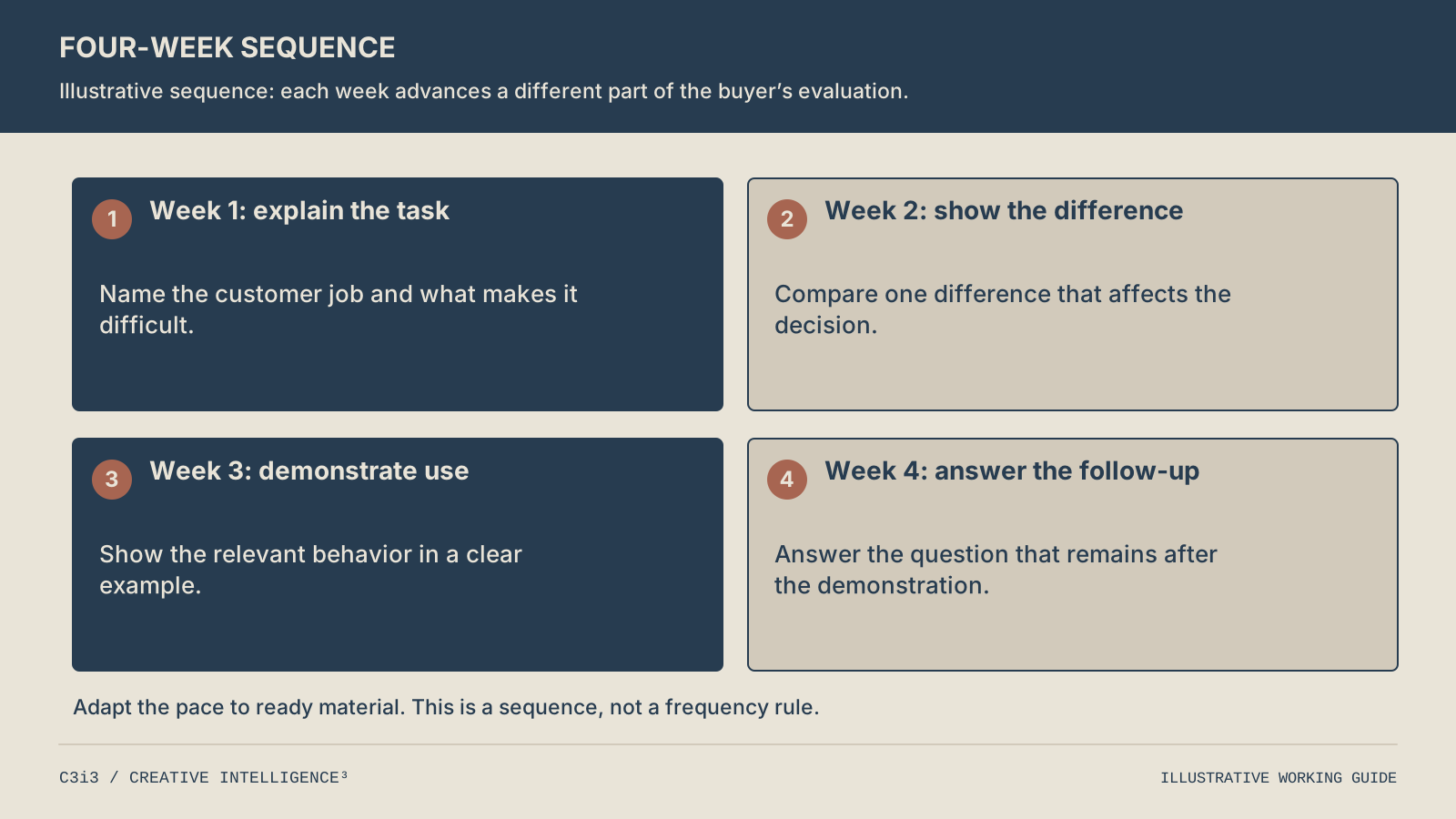
The example first explains the task, then compares meaningful differences, demonstrates use and answers the next question. Adapt the pace to ready material and audience needs; this is not a universal frequency rule.
How do you handle gaps, delayed material and reusable content?
Keep a small reserve of relevant material and review the readiness of upcoming items. When a piece is delayed, replace or move it deliberately instead of publishing an incomplete explanation to protect the calendar.
A reserve can include a current question-and-answer piece, a useful diagram or an existing demonstration that has not been overused. Check it before rescheduling. Product information and destinations can change, so “evergreen” is a description of intended usefulness, not a reason to skip review.
When is repurposing useful rather than repetitive?
Repurposing is useful when the new format helps the audience understand a different aspect of the same question. A full setup video may support a short clip showing one adjustment and a diagram that makes the sequence easier to revisit. Releasing the same video with a different introductory sentence may offer little additional value.
Leave some room for questions that arise during the month. Record the reason for a change, especially when it affects a planned sequence. The calendar then becomes a useful history of editorial choices rather than a static document that stops matching the work. For the broader relationship between profiles, posts and destinations, the SMO fundamentals guide remains a useful reference. The calendar’s narrower job is to keep those choices executable over time.
What should you review before planning the next month?
Review what was published, what stalled and what the team learned about the customer questions. Separate production reliability from audience response so each problem receives the right adjustment.
First reconcile the calendar with the live record. Identify pieces that moved, destinations that changed and ideas that never had enough material. If the same dependency caused several delays, address it before repeating the schedule. The team may need a clearer shot brief or a more realistic material-supply rhythm.
How should performance notes influence the next calendar?
Add concise observations to the content record rather than declaring a topic successful from one number. A piece may attract useful attention but need a clearer next step. Another may generate fewer views while answering a question repeatedly raised in substantive inquiries. Preserve the evidence and its limits.
Use consistent campaign names for website links when tagging is appropriate. Google’s campaign URL reference explains how parameter values organize referral reporting. Keep those names linked to the calendar so the reporting team can recognize the asset. Do not add campaign parameters to ordinary internal website links. The social reporting guide explains why observed visits and confirmed business inquiries should remain separate. Use the next month to repeat useful explanations, fill real gaps and adjust production steps the team can control.
What else should you know about a social media content calendar?
Do we need a specialist scheduling tool to start?
No. A shared table can work when the team can find the source, draft, final asset and live record. Begin with the fields people genuinely need. A specialist tool may become useful as the number of channels or contributors grows, but it cannot resolve an unclear audience or missing material. Evaluate whether the tool makes the existing workflow easier before adding complexity.
Should we plan every post a month in advance?
Plan the main themes and dependencies ahead, while leaving room for useful changes. Some assets require early preparation; others can respond to a newly observed question. The calendar should distinguish committed pieces from tentative ideas. A complete month of fixed captions can create unnecessary rework if the business already expects a product or destination change during that period.
Can the same calendar cover more than one platform?
Yes, if each platform version has a clear job and the team can track its readiness. Keep the underlying customer question connected across versions, but record the different format, destination and publication slot where necessary. Avoid a row labeled “all platforms” if it hides different asset requirements. The aim is shared visibility without pretending that every channel uses the same content in the same way.
What should we do if we miss a planned publication date?
Check whether the piece remains useful and whether the delay affects another item. Reschedule deliberately, update the live record when it publishes and identify the dependency that caused the miss. Do not release an unfinished asset merely to keep the original date. One honest schedule change is more useful than a calendar that appears complete while the actual customer explanation remains confusing.
Should a calendar include posts that are not directly promotional?
Yes, when they answer useful questions for the intended audience and relate to the business’s offer. A comparison, setup explanation or selection checklist may help a customer before a direct inquiry is appropriate. State the role of that content so it is not judged solely by immediate contact requests. A useful mix supports different decisions without turning the calendar into unrelated entertainment.

How C3i3 Can Help
C3i3 can help turn an agreed social direction into a practical production calendar with clear questions, source material and destinations. We can also develop the original writing, illustrations and video assets needed to make that schedule useful.
Explore social media optimization services or show us the month of content you are trying to organize. Bring your existing material and the dependencies that keep delaying publication so the next plan reflects how your team actually works.