



































You send a prospective customer your website. They say they’ll take a look. Then the conversation goes quiet.
Maybe they weren’t ready. Maybe another company was a better fit. Or maybe your website made a capable business look difficult to understand. That last possibility is frustrating because the work behind the website may be excellent.
Before buying more traffic or starting a redesign, follow a new customer’s route. Can they understand your offer, see relevant work and contact you? Start with a phone, recent inquiries and an unfamiliar reader.
The aim is to find the point where a useful conversation becomes harder than it needs to be. Start there.
Start with the inquiry you actually want
“More leads” sounds sensible until your inbox fills with requests you cannot help with. Write down one kind of inquiry you would welcome this month. Include the work, the customer’s situation and the information you need to begin.
A commercial electrical contractor might want inquiries about planned tenant improvements. An industrial supplier might want an application discussion with an engineering team. A local professional-services firm might want an owner who needs help with a particular decision. Those visitors need different evidence and different next steps.
Read your homepage with that inquiry in mind. Does it help that person recognize a fit? Keep a description of the desired inquiry beside you during the review.
Walk through the four places a customer can get stuck
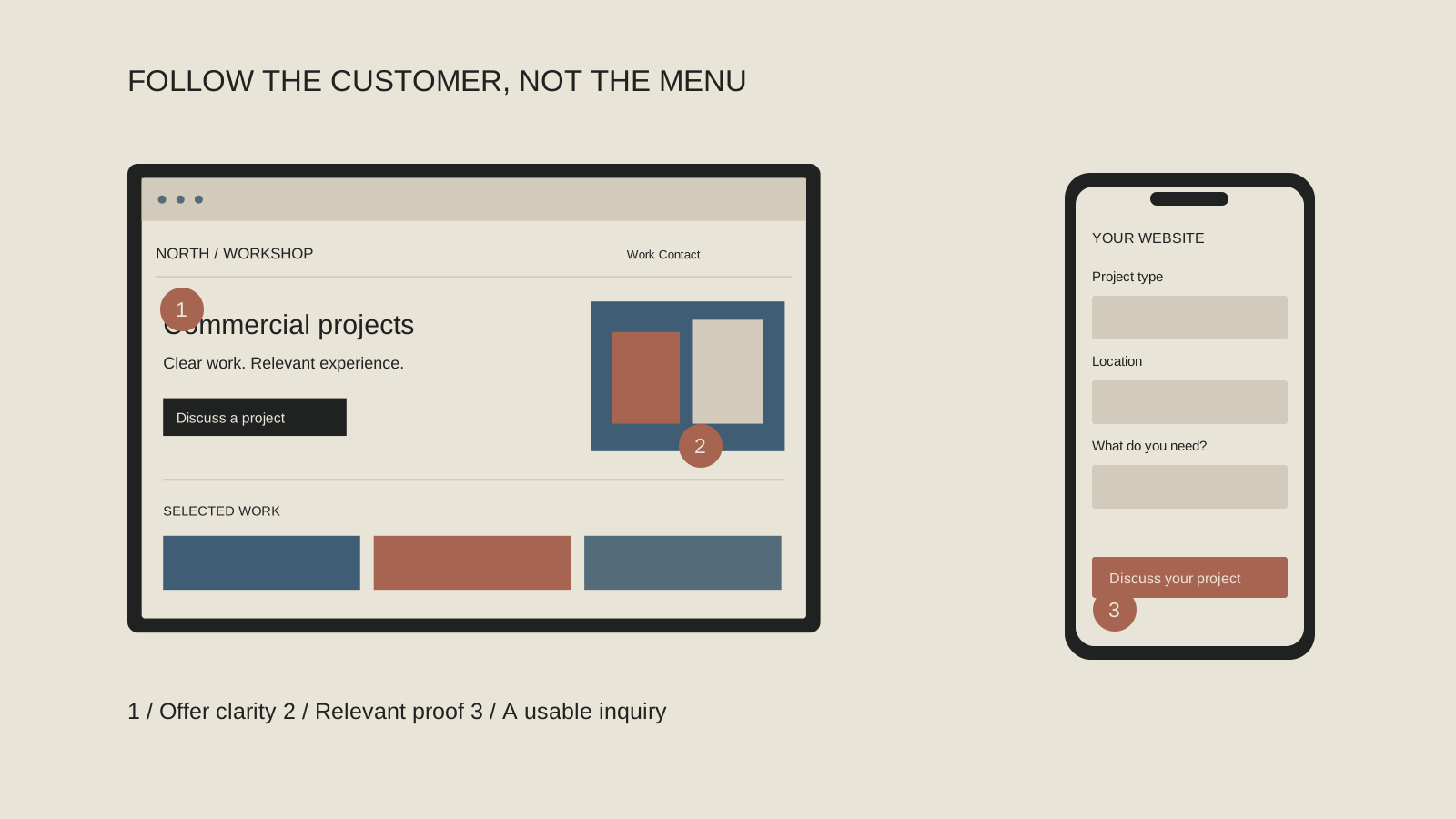
Think of your website as a conversation with four questions: Am I in the right place? Can this company help? Why should I believe it? What happens next?
On your phone, follow a service link, find an example of the work and try the inquiry route. Record what you have to guess: the service, your role in a project or what a form question means.
The visual below is a review map, not a prediction of how every buyer behaves. Some people arrive directly on a project page; others already know you through a referral. Check the relevant pages wherever the conversation starts. If a step is difficult, record the page, the unanswered question and one change you can make. Avoid turning a small review into an endless wish list.
Let someone unfamiliar with the business read the first screen
Your team knows what “integrated solutions” means. A stranger may have no idea whether you design websites, install equipment or provide business advice. Familiarity makes unclear copy surprisingly hard to notice.
Ask someone outside the business to look briefly at the homepage, then explain what you do and who you help. Stay quiet while they answer. If they guess wrong, don’t rescue the page with a verbal explanation. Write down the phrase they misunderstood and the question they asked instead.
Then try a plain sentence: “We help [type of customer] with [specific work or problem].” Add a useful qualifier only if it is accurate. Our homepage clarity test gives you a simple script and a before-and-after example. Treat the first screen as an invitation to understand the business, rather than a place to fit every credential and service.
Show the part of your work that helps someone choose
“We do quality work” asks the visitor to trust a conclusion. A short explanation of a relevant assignment gives them something to examine. Show the situation, your actual role, the work performed and an outcome you can support. If you do not have a measured result, explain the completed deliverable without inventing a percentage.
Look in the material you already use in sales conversations. A proposal may explain a difficult problem clearly. A project closeout may identify the scope. An approved product document may answer the question buyers keep asking. This can become useful website content once the right facts, images and permissions are checked.
For a Bay Area contractor, that might be an approved project profile explaining its specialty. For a manufacturer selling nationally, it may be an application explanation backed by current product information. Our proposal-to-project-story guide shows what to extract and what to leave private.
Where does the conversation get stuck?
Follow one realistic customer task. At each stop, write down the question the page leaves unanswered.
Recognize
“Is this the kind of company I need?” Check whether the service and intended customer are easy to identify.
Evaluate
“Can they handle work like mine?” Find a relevant project, product explanation or deliverable that shows the actual contribution.
Trust
“What supports what they are saying?” Check the facts, source material and context behind the important claims.
Contact
“What should I do next?” Try the inquiry route and confirm that the request reaches someone who can respond.
Try contacting your own company
Use the public contact route on a phone. Can you understand each field? Is it obvious which information is required? Can you complete it without pinching and zooming or losing your place? If you make a test submission, label it clearly so your team does not treat it as a customer request.
Check the receiving side too. Confirm that the inquiry reaches the person who can respond and that the visitor sees a clear confirmation. A submitted form and a handled inquiry are two different things. You may find that the page works but the internal handoff needs attention.
Use descriptive field labels and explain what happens next without promising a response time you cannot keep. The W3C’s form-label guidance is useful for the person implementing these details. An owner’s quick test can expose friction; it does not replace a fuller accessibility or technical review.
Check the source before blaming the page
A website cannot make every visitor a suitable customer. If an advertisement, directory listing or social post promises something different from the page, the mismatch starts before the click. Review the message that brought people in, especially when inquiries suddenly change.
Look at recent conversations rather than relying only on a traffic total. What did people ask for? Where did they say they found you? What did they expect? A few specific answers can suggest a useful investigation, although a small sample does not establish a universal cause.
If the wrong requests keep arriving, use the wrong-customer message review to compare your headline, examples and calls to action. You might need clearer service boundaries, a different campaign destination or better inquiry routing. Changing the colors will not resolve a promise that was wrong before someone reached the site.
Choose one change you can explain
Take your notes and circle the problem with the clearest evidence. Perhaps three people misunderstood the same headline. Perhaps your strongest project has no description. Perhaps the form confirmation never appears. Give that problem an owner and define what a better experience would look like.
Keep a dated copy of the page before editing it. After the change, repeat the same task and ask whether the problem is easier to resolve. For inquiry quality, allow enough time to see relevant conversations and record other changes that could affect the result. Don’t attribute every improvement or quiet week to a single edit.
Deeper problems may justify a redesign. Use our five checks before a redesign to prepare a useful brief.
A short checklist to keep beside you
Make one useful change first
You do not need to diagnose the entire website today. Find one question a good prospective customer should be able to answer, and make that answer easier to find. If the review exposes a larger problem, C3i3 can help connect positioning, website copy and design around the way your customers actually choose. Bring the pages and questions that caused trouble; they are a useful starting brief.